- New release
Pragma 1.1: Take back your disk
A storage manager that shows where your worktrees' space went and clears gitignored output safely, plus projects without Git and one-tap reconnects in Pragma Go.
Running agents in parallel means running them in parallel worktrees, and every worktree brings its own node_modules, build output, and caches. A week of fanouts can quietly eat tens of gigabytes. Pragma 1.1 adds a storage manager that shows you where that space went and gets it back without touching anything you'd miss.
Download Pragma 1.1, or let the app update itself.
See where the space went
Open Settings → Storage. In global scope, every project Pragma manages is drawn as a treemap, with each project's worktrees nested inside and one box for every top-level folder of 15 MB or more. A box's area is its share of the bytes on disk, so the worktree with three copies of your dependency tree is hard to miss. Switch to project scope to look at a single project's worktrees.
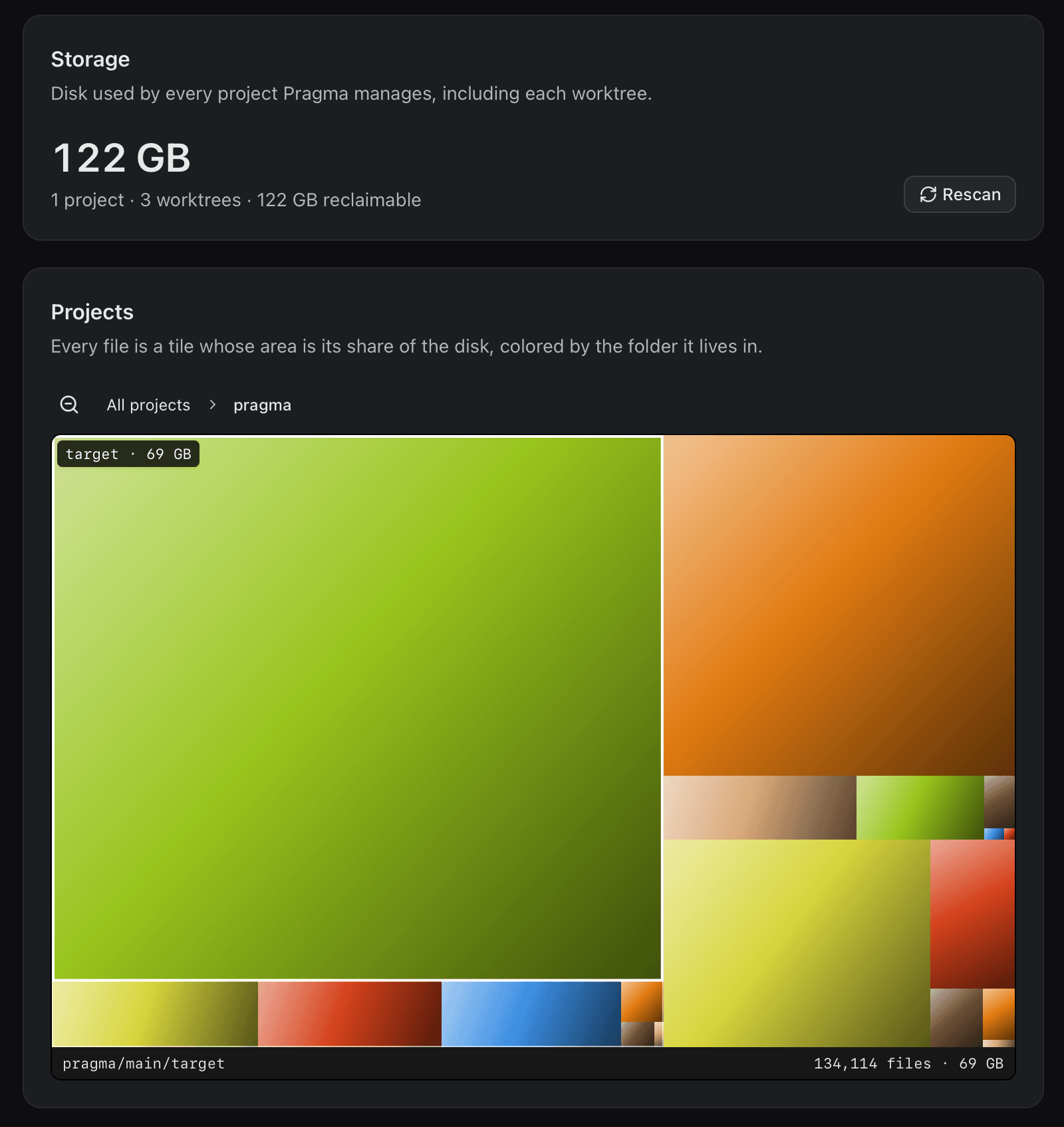
Hover a box to see its name and size, click to zoom into a project or worktree, and use the breadcrumb or scroll back out to return. The Worktrees list beneath the map gives the exact size of each one.
The numbers are honest about how disks actually work. Sizes are what files occupy on disk, not their byte length, and a file hard-linked into several places, as bun and pnpm do for dependencies, counts once. A main checkout's total excludes the worktrees under .pragma/worktrees/, so nothing is counted twice. Each worktree is measured on the machine that owns it, which means an SSH project reports the remote disk. Pragma only scans while the page is open, and it stops the moment you leave.
Free up space, safely
Free up space lists every gitignored folder of 1 MB or more, largest first, alongside the worktree it lives in. Delete folders one at a time, or clear the lot with Delete all. Pragma confirms before deleting anything.
Right before it deletes, the host checks again that Git still ignores the folder and that it is a real folder rather than a link. It never touches .git or .pragma. Everything on the list is something your tools can rebuild: run bun install or cargo build and it comes back.
If you'd rather not think about it, turn on a storage reminder. Pick an interval, from weekly to every 90 days or a custom number of days, and Pragma will nudge you with an Open Storage button when it's time for a look. The Storage guide covers the details.
Projects without Git
Not every folder is a repository, and it doesn't have to be one to be useful in Pragma. Open a plain folder and Pragma offers to initialize a repository, or to continue without Git. A project without Git gets a single root worktree where terminals, tabs, and agents work exactly as usual. Git-only features such as new worktrees, Changes, and Pull Request stay out of the way until you're ready. Initialize a repository later from the new-worktree button and they switch on. Since there's no history to restore from, the Files pane asks before deleting anything in a folder without Git.
Reconnect Pragma Go in one tap
Pragma Go now remembers the desktops you've paired with. They appear under Previous connections on the pairing screen: tap one to reconnect with its saved token, or remove it when you're done with that machine. In the browser, connections last only as long as the session unless you choose Remember this browser. Unpairing from Settings works immediately, even if the desktop is unreachable, and regenerating the token on the desktop invalidates saved connections. See the mobile guide for more.
Get 1.1
Pragma 1.1 is available now for macOS, Linux, and Windows. Download it, or read the source on GitHub.