Run teams of coding agents in parallel
Orchestrate Claude Code, Codex, OpenCode, and 7+ each in their own worktree.
macOS, Linux, and Windows. Local, over SSH, or inside WSL. All downloads
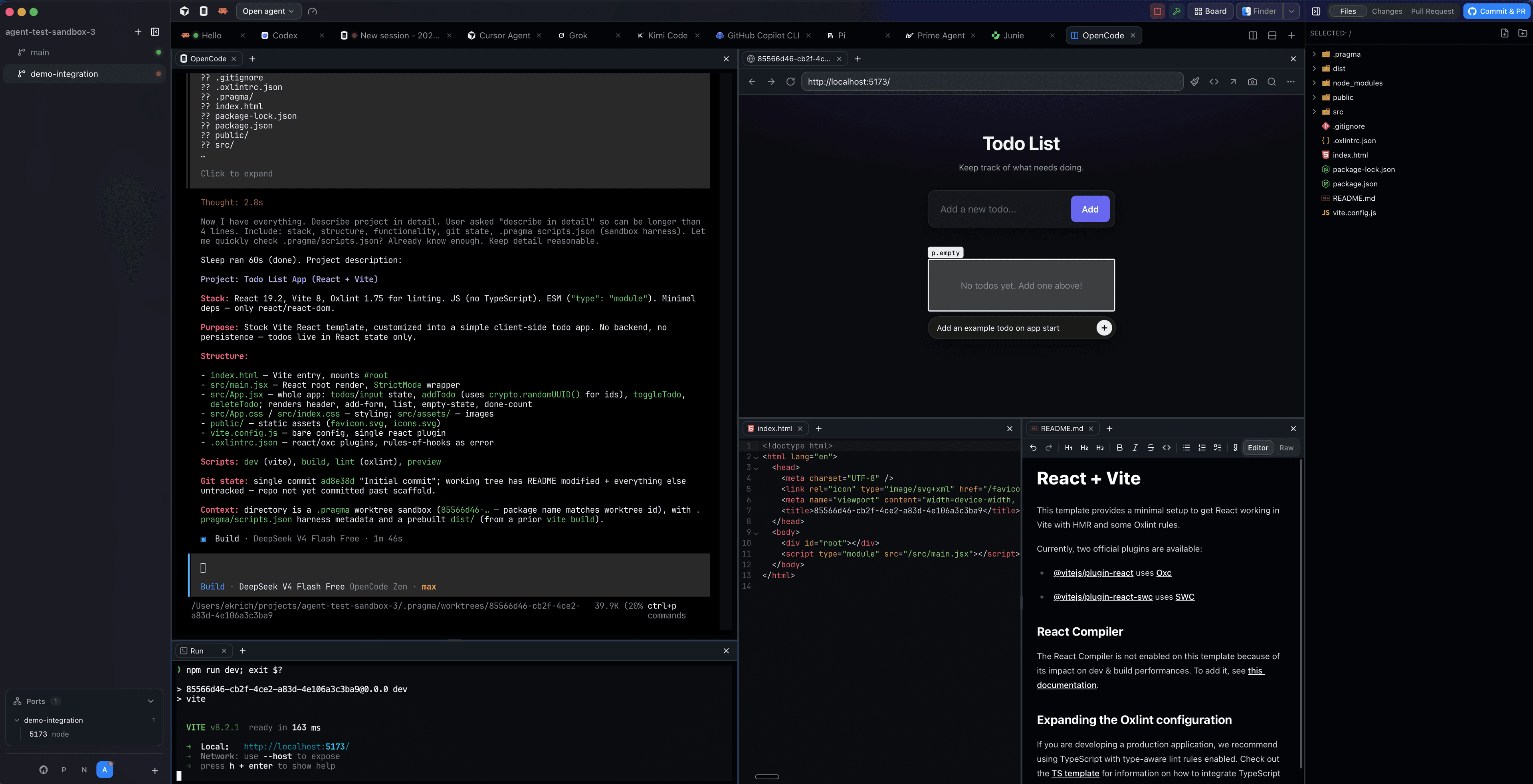
Every agent gets its own branch, terminal, and attention budget
Switch projects from the rail, launch any agent, and get told the moment it finishes. Every agent runs in an isolated worktree, so parallel work never collides.
- Many projects, one window. Run agents across every repository you work in from a single rail — switching projects never closes a session or costs you a second app.
- Integrated and nested worktrees. Pragma creates the git worktree and its branch for you, and a worktree can nest under another — so a follow-up task branches off the work in progress, not off main.
- Real terminals, native TUIs. Each agent runs its own CLI exactly as it ships — Claude Code, Codex, opencode, Cursor — in a GPU-accelerated terminal, alongside your dev servers, tests, and build scripts.
- Status you can trust. Plugins report running, done, and needs-you as coloured dots, a chime, and a system notification — so an idle agent never waits unnoticed.
From task to pull request without leaving one screen
The board is a high-level alternative to managing agents through terminal tabs: turn tasks into cards, track progress across worktrees, and review results in one place.
- Cards, not tabs. A project-scoped board of prompts with enforced transitions: draft, in progress, review needed, completed.
- Background launches. Sessions spawn straight into the host server, so the board stays up while agents work; open a card later and the scrollback is all there.
- Finish in one action. Commit everything, draft the pull request with AI, push, and open it — the card keeps the PR number.
Race your agents, keep the winner
One prompt, several isolated attempts under a coordination parent. Compare them side by side and merge the one that actually worked.
- One comparison grid. Live terminals, diffs pinned to the base commit, and each attempt's scratchpads aligned in the same columns.
- Pick a winner in one click. Choose the strongest result and merge it back into the coordination worktree without leaving the comparison.
- Agents can fan out too. The Pragma skill lets agents create their own fanouts, monitor every attempt, and bring back the best result.
Review code before it leaves your machine
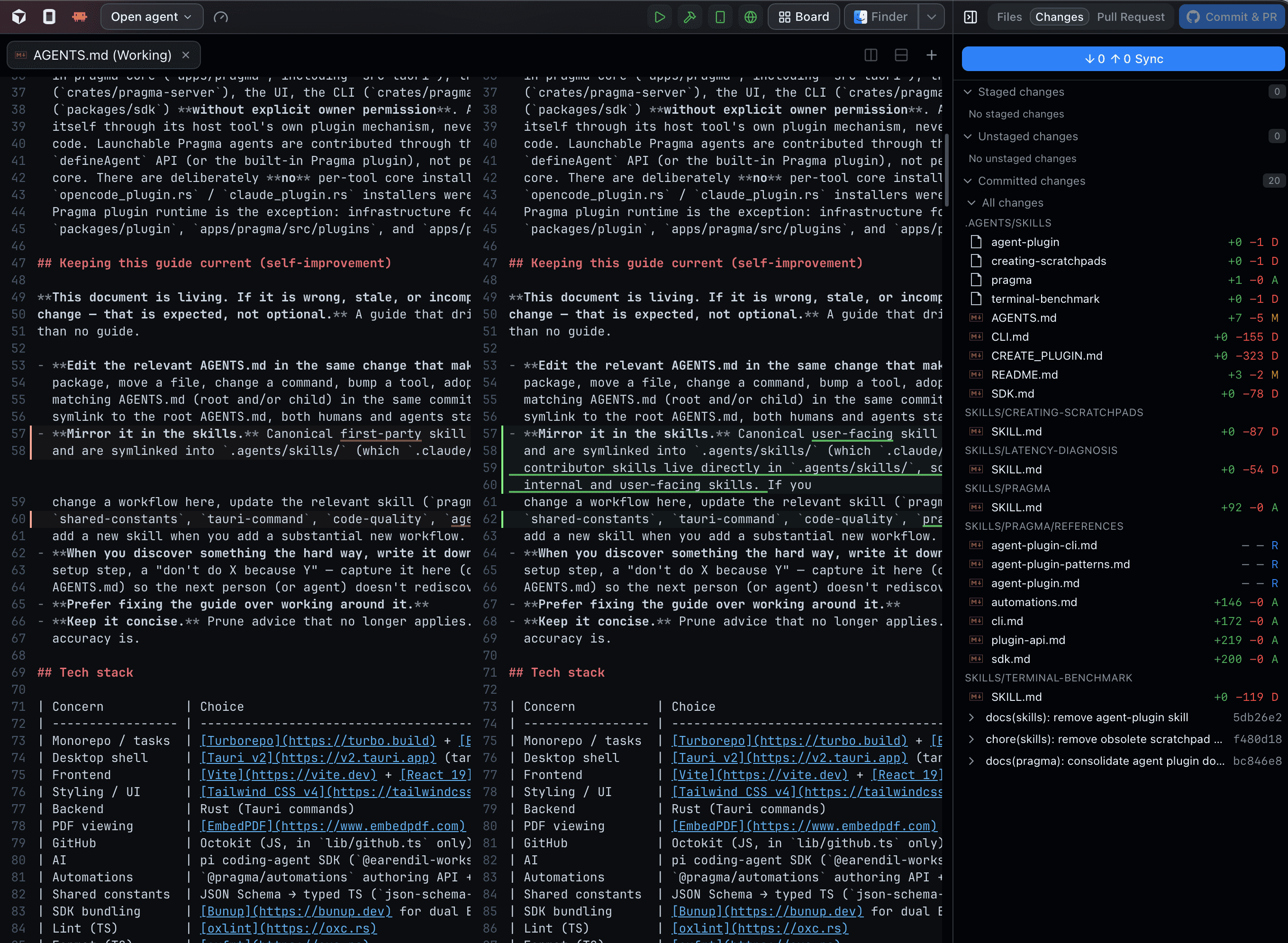
Staged, unstaged, and committed changes with one unified diff per file, right beside the terminal the agent wrote them in.
- Diffs that follow the worktree. Baselines resolve against the Pragma parent branch, so a moving main never scrambles your review.
- Stage and commit in place. Stage a file or the whole worktree, commit with a generated message, and push — no context switch to a second git client.
- Know exactly what will ship. Review the final branch diff against its parent before pushing, so generated changes never hide between commits.
Ship the pull request without leaving the worktree
Pragma signs in to GitHub once, then the whole pull-request lifecycle — open, review, discuss, fix — happens beside the worktree the code came from.
- Open the PR from the worktree. AI drafts the title and body from the actual diff; edit it in a markdown WYSIWYG, and pre-flight checks catch an uncommitted or unpushed branch before you submit.
- Review it here. Checks, commits, changed files, and review threads in one view — read every file as a unified diff, reply inline, and resolve threads from the app.
- Fix with AI. Flag review comments into a fix-it list and hand the whole list to an agent — in the same worktree, or on a fresh one it creates for the fix.
- Stacks, not one giant branch. A PR can sit on top of another, and Pragma links the stack from your local ancestor chain so each piece stays reviewable on its own.
Your key, your account, wired into the app
Pragma's own AI is small on purpose: it writes the commit, drafts the pull request, edits the file under your cursor, and answers the quick question — using your provider credentials. Add a System 1 model like TypeSafe's Jev and it makes the fast calls too.
- Inline edit with ⌘K. Select lines, describe the change, and review it as red/green hunks you accept or reject one at a time. Nothing touches disk until you save.
- Auto-commit and push. Let Pragma write the commit message, commit the worktree, and push the branch when the agent finishes.
- Ask from the palette. Type a question in the command palette and get a streamed answer scoped to the project and the worktree you are in.
- Jev picks, tracks, and merges. Connect TypeSafe's Jev and Auto picks the agent, model, and effort for each launch, every agent shows what it is doing and how far it has got, and merge conflicts resolve themselves, with uncertain files double-checked by your built-in AI.
Every agent account, one menu away
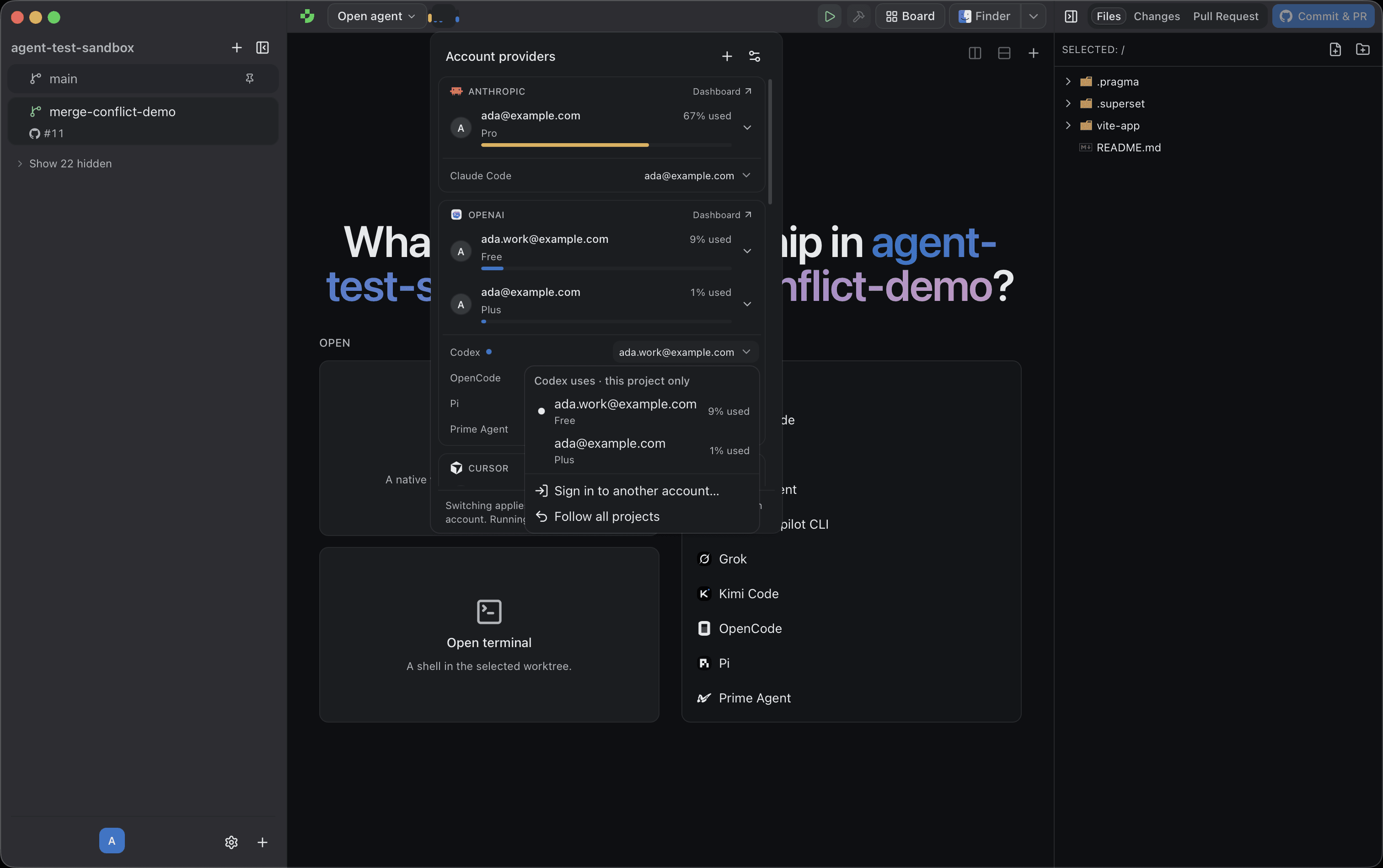
See every account your agents sign in to, how much of each plan is left, and which account each agent launches with — then change it in a click.
- Switch in one click. Each agent has a picker naming the account it launches with. New sessions start on the new account; running ones keep the account they started with.
- A different account per project. Pin your work subscription to work repositories and your own to side projects — everything else follows the global choice.
- Usage limits at a glance. Every account shows its plan and how much of each limit is used, with a reset countdown, and the toolbar fills to whichever account will stop you first.
- Sign in once. Add an account through the agent's own login without leaving Pragma, and share a sign-in between agents wherever the provider allows it.
Enough editor to never break flow
A file tree, a real code editor, a markdown WYSIWYG, and viewers for the things agents leave behind — then one click into the editor you actually live in.
- Files and edits. Lazy file tree with inline create, rename, and delete; CodeMirror editors with syntax highlighting and explicit saves.
- Markdown both ways. A WYSIWYG mode with tables and task lists, and a raw mode sharing the same buffer, the same file, and the same ⌘K edits.
- Viewers included. PDFs render locally with a bundled engine; images, video, and audio open in a themed viewer. No CDN, no round trip.
- Open in your editor. VS Code, Cursor, Windsurf, Zed, Sublime Text, IntelliJ IDEA, or the file explorer — one click, right worktree.
A plugin API, not a settings page
Pragma's own agent integrations are plugins. Everything they use is public, so anything you build sits at the same level as what ships.
- Build your own workflow. Add project tools to the sidebar, surface review queues as cards, open custom web views, and wire repeatable actions into the command palette.
- Add an agent with a skill. A shipped agent-plugin skill walks any coding agent through wiring a new CLI into Pragma — hooks, status, icons, verification.
- Bring your own agent plugin. Package any coding agent with its own launcher, icon, status reporting, and account providers, then install it alongside the integrations that ship with Pragma.
import { defineCommand, definePlugin, defineSidebarTab } from "@pragma-sh/plugin"; import { ReviewQueue } from "./review-queue"; export default definePlugin({ name: "Review Queue", description: "Everything waiting on me, across every worktree.", ui: { sidebarTabs: [ defineSidebarTab({ id: "queue", title: "Queue", component: ReviewQueue }), ], }, commands: [ defineCommand({ id: "review-queue.open", title: "Open review queue", defaultBinding: "mod+shift+r", run: (ctx) => ctx.notify("Review queue opened"), }), ],});Agents that operate the workspace itself
pragma-cli and @pragma-sh/sdk make Pragma scriptable, so an agent can create the worktree, launch a peer, compare attempts, and publish a document for you to read.
- One binary, installed for you. Report status, create worktrees, fan out, merge, and stream another agent's output — from inside any Pragma terminal.
- Round trips, not just events. Agents ask questions and request command approval, then block on your answer through the same channel that renders it in the app and on your phone.
- Scratchpads as output. Instead of a wall of terminal text, an agent publishes interactive MDX you can edit, comment on, and reply into.
$ pragma-cli fanout create "Add token refresh" \$ --agent claude-code --agent codex --agent opencodefanout fan_8fa2 · 3 attempts · base main@f50343fclaude-code running fan/8fa2-claude-codecodex running fan/8fa2-codexopencode done fan/8fa2-opencode$ pragma-cli agent report --agent dev startedreported · status visible in the app and on your phoneYour workspace, from the couch
Turn on the tunnel and the local gateway becomes reachable from your phone — or from any browser, over a link you can share.
- Self-hosted by default. The gateway binds to localhost and is exposed only through a tunnel command you configure, with a bearer token you can regenerate.
- Do real work. Create worktrees, launch agents, watch running sessions, answer approvals and questions, and read scratchpads.
- Your plugins come along. Custom agents and their icons resolve on the phone exactly as they do on the desktop.
- Also in a browser. The same client ships as a web build the gateway serves, so a shared URL is all a second device needs.
The parts that make it a workspace
Thoughtful details that make every session smoother.
SSH projects
Open a project on another machine and its terminals, files, git, and search all run there. On Windows, WSL distributions are shells you can pick per project.
Project scripts
Setup, run, and build commands live in .pragma/scripts.json, run per worktree, and their open ports surface in the sidebar and the palette.
Automations
React to host events instead of polling: auto-review a PR the moment it opens, restart a crashed dev server, or ping your phone when an agent needs input.
Agent skills
Shipped skills teach any agent how to build a Pragma plugin, write a scratchpad, or diagnose latency, so onboarding an agent is a prompt, not a manual.
TypeScript SDK
@pragma-sh/sdk is a typed client for the local gateway: sessions, files, git, agents, scratchpads, and a duplex channel to a running agent.
Scratchpads
Agents show their work instead of walls of text: live charts, diff reviews, and question cards you edit and comment on in place.
Whiteboards
Durable Excalidraw canvases per worktree. Agents create and revise them from the CLI, you edit them in a tab, and scratchpads embed them as live diagrams.
Persistent app server
Like tmux, but for your agents: close the desktop app and your sessions, automations, and phone link all keep running.
Command palette
One box for worktrees, tabs, agents, pull requests, filenames, code search, running scripts, open ports, and a one-shot AI answer.
Splits and tabs
Terminals, editors, diffs, and native browser views split any direction, persist per worktree, and reattach after a restart.
Agent alerts
A chime, a system notification, and a status dot the moment an agent finishes or needs a decision — with your own sound clips per project.
Keybindings
Every action is rebindable per platform, globally or per project, validated on write so a bad chord can never lock you out.
Storage manager
A treemap of what every project and worktree costs on disk, measured on the host that owns it. Delete gitignored build output and dependencies in a click, or get a reminder to check.
The same worktrees, a much larger workspace
Everyone in this space isolates agents in git worktrees. Pragma is the one that treats the surrounding environment — plugins, automations, editors, boards, phones — as part of the product.
| Capability | Pragma | Emdash | Orca | Superset |
|---|---|---|---|---|
| Native shellRust host + the OS webview, not a bundled browser | Tauri + Rust | Electron | Electron | Electron |
| Agents as pluginsEach integration is its own versioned package with official branding | Yes | Partial | Partial | Partial |
| Public plugin APIThird-party sidebar tabs, cards, web views, and commands in the app itself | Yes | No | No | No |
| Programmable automationsYour own TypeScript running on host events, not just a schedule | Yes | Partial | Partial | Partial |
| Interactive agent scratchpadsAgents write MDX with live React components you can edit and comment on | Yes | No | No | No |
| Agent boardPrompt to review to pull request as tracked cards | Yes | No | No | Yes |
| Fan out + comparison viewOne prompt into N attempts, compared as terminals, diffs, and scratchpads | Yes | No | Yes | Partial |
| Editing suiteCode editor, markdown WYSIWYG, PDF, image, video, and audio viewers | Yes | Partial | Partial | Partial |
| Built-in AI, your keyInline ⌘K edits, one-click PR drafting, ask-anything from the palette | Yes | No | Partial | No |
| Auto agent & model picksA System 1 model picks the agent, model, and reasoning effort for each launch | Yes | No | No | No |
| Live agent progressWhat each agent is doing right now, with an estimate of how far it has got | Yes | status only | status only | status only |
| AI merge-conflict resolutionResolves each conflict in the PR view, double-checks uncertain files, then commits | Yes | No | hands it to an agent | No |
| Agent accounts & usage limitsEvery agent's accounts and plan usage, switchable globally or per project | Yes | No | Partial | Partial |
| Mobile & web clientPlatforms it ships, and how you reach it off your LAN | iOS, Android, Web — own tunnel | No | iOS, Android — Orca Relay (hosted) or LAN | none yet — listed "coming soon" |
| Persistent host serverSessions, tunnels, and headless launches survive quitting the app | Yes | Partial | Partial | Partial |
| Remote projectsSSH hosts as first-class remote projects | SSH | SSH | SSH + WSL | No |
| User themesEditable colour tokens per project, not a fixed preset list | Yes | Partial | Partial | Partial |
| LicenseWhat you are allowed to do with the source | AGPL-3.0 | Apache-2.0 | MIT | Elastic 2.0 |
Checked against the generalaction/emdash, stablyai/orca, superset-sh/superset repositories (README, LICENSE, and linked docs) as of 2026-08-29, with the mobile row re-verified on 2026-09-05 after both projects shipped changes: Orca added a hosted "Orca Relay" tunnel option, and Superset's own pricing page now lists its mobile app as "Coming soon" rather than shipped. The Auto, agent progress, merge-conflict, and accounts rows were checked on 2026-10-03: Orca and Superset both track usage and switch accounts globally (Superset for Claude Code and Codex), with no per-project choice, and Orca resolves conflicts by launching an agent on them. This space moves fast — if something here is out of date, open an issue on https://github.com/pragma-sh/pragma and we will correct it. Read a fuller, sourced write-up for each one on the comparison pages, including how to migrate.
Stop babysitting one agent at a time.
Open a project, fan a prompt across your agents, and come back to pull requests.